For REACH registrants, only representatives and consultancies

Your study reports, reported into IUCLID.

Dossier Flow reads your PDF study reports, drafts the corresponding IUCLID study records for expert review, and once you approve them, types them into the IUCLID tab you are already logged into. No server-side install, no REST API project, and no need to share your IUCLID credentials with anyone.

Works on any IUCLID reachable from your browser Nothing to install beyond a browser extension 7 day free trial
The problem

Dossier preparation is expert work buried under data entry.

A single robust study summary can mean transcribing dozens of fields from a study report into IUCLID by hand, picking the right entry from every phrase list, and getting the units right. The judgement takes minutes. The typing takes hours, and it is where the errors come from.

Transcription, not science

Every value in a study record already exists in the report. The work is finding it, mapping it onto IUCLID's field model, and typing it in without slipping a decimal.

Integration projects that never start

The IUCLID REST API is the textbook answer, and it requires enablement, server configuration and an IT project per installation. Most teams never get past that first meeting.

Credentials nobody wants to hand over

Any tool that logs into IUCLID for you needs an account, a password and a network route into your dossier repository. That is a conversation with your security team, every time.

How it works

Four steps, and only one of them happens on your screen.

The cloud does the reading, the drafting and the bookkeeping. Your browser does the writing. Between the two sits a human decision that nothing can skip.

Upload and tag

Drop your PDF study reports onto a substance. Tag each file with the endpoints it covers, or let the AI propose the tags. One report can feed several endpoints, an OECD 422 being the obvious case.

Draft with AI

Claude Opus reads the report against the IUCLID field schema for that endpoint and drafts a complete study record as structured data. Scanned reports are transcribed first by Claude Haiku's vision model, so image-only PDFs are not a dead end.

Review and approve

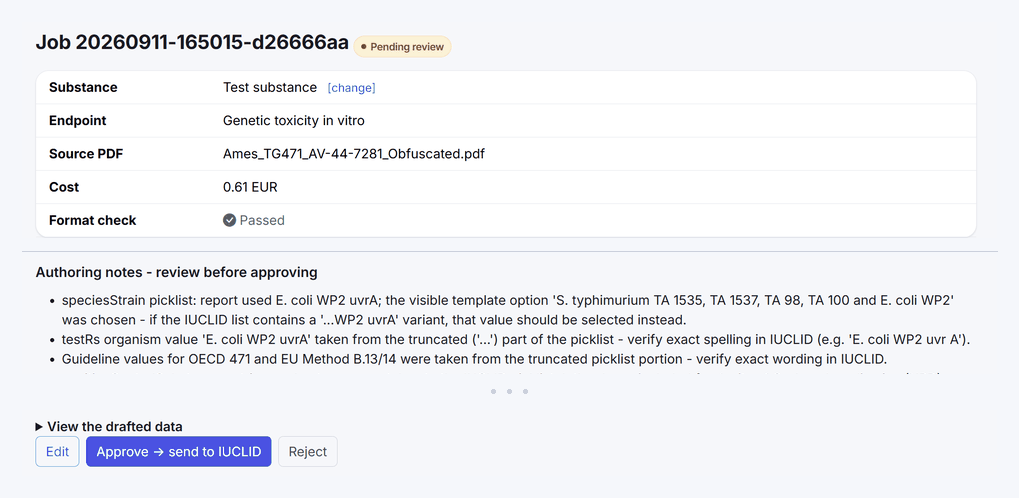
The draft lands in a review queue with its authoring notes, its format check and its cost. Nothing is ever written into IUCLID before a person approves it. Every derived value is flagged as a draft for expert review.

Write into IUCLID

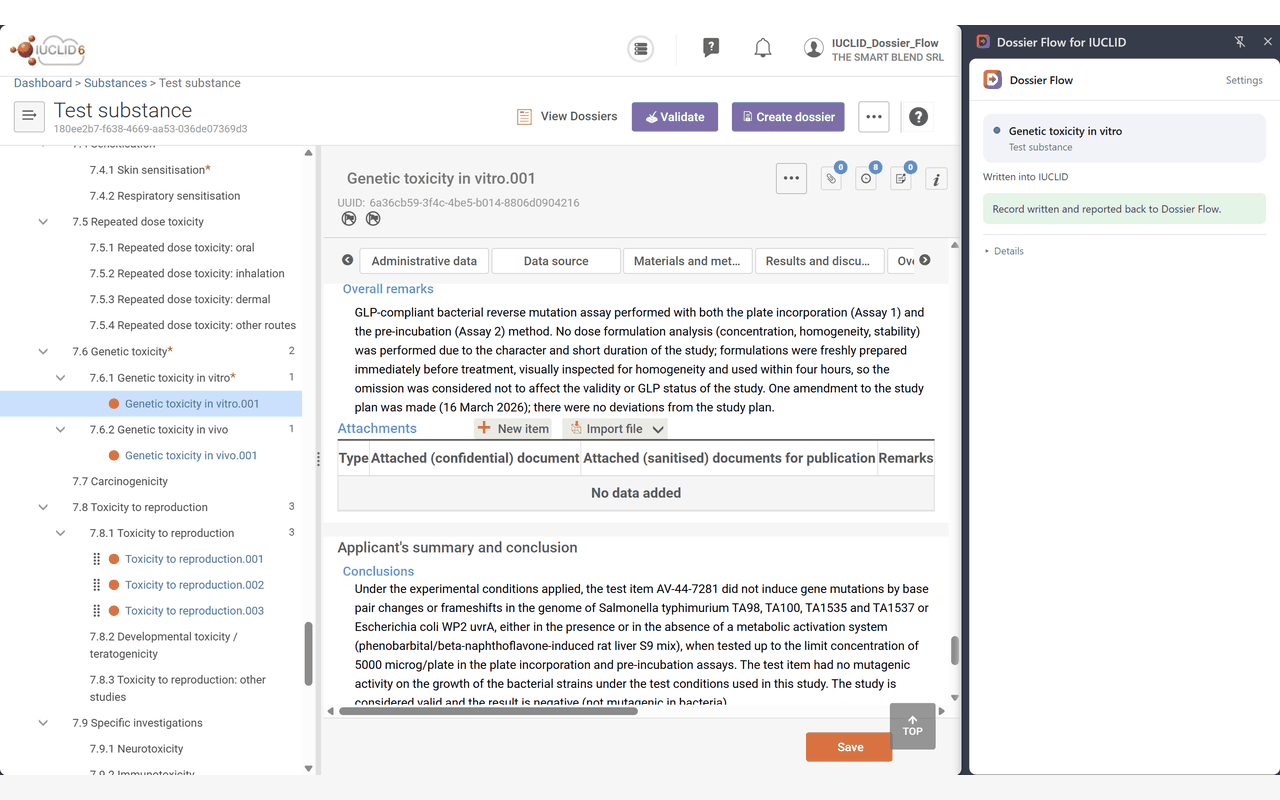
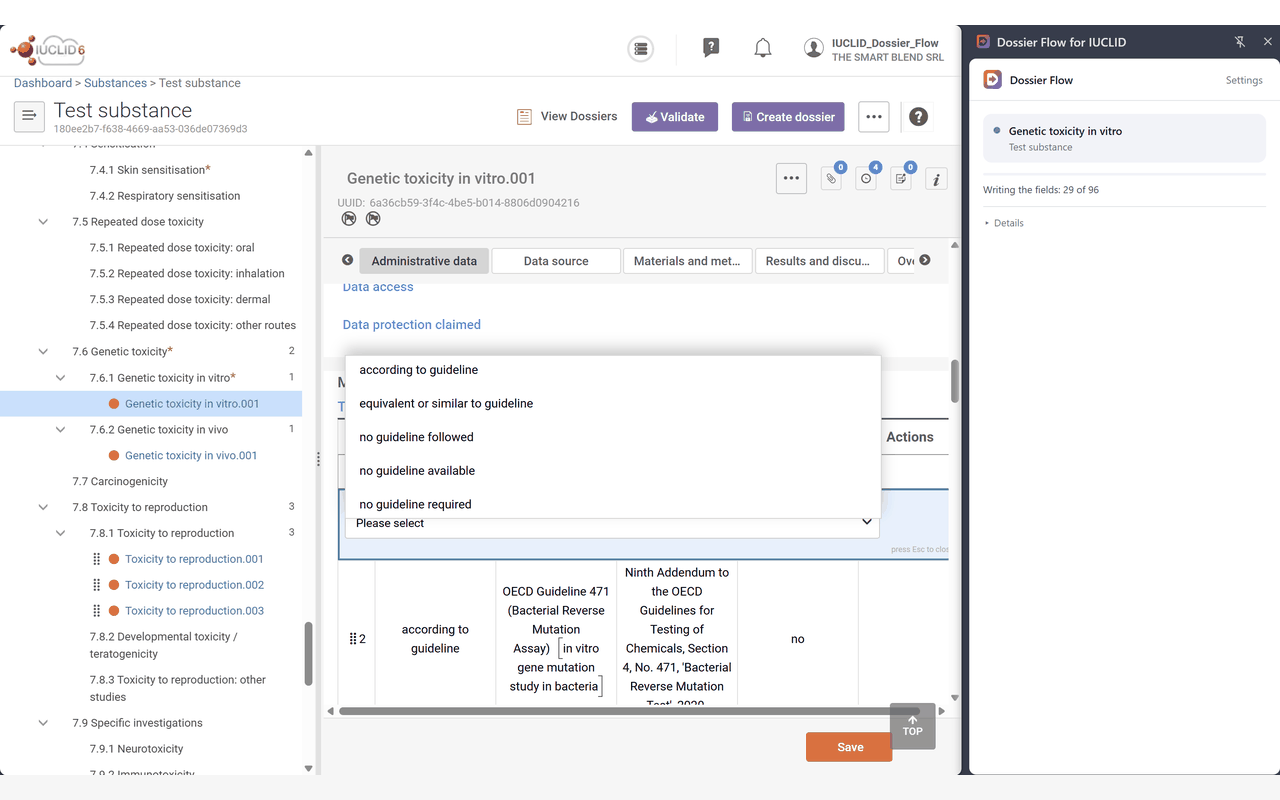
Open your IUCLID tab, click the extension. It confirms it is on the right record, creates the study record if it does not exist, fills each field the way a person would, and reports field by field what it wrote back to your queue.

How a study report becomes an IUCLID record A study report is uploaded to the Dossier Flow cloud, where a language model drafts a record and the result is validated against the IUCLID field schema. A person reviews and approves it, which produces an action plan. The browser extension executes that plan inside the user's own authenticated IUCLID session. The cloud never touches IUCLID. Our cloud Your computer the boundary Study report PDF you upload and tag Draft model reads it against the schema You approve a person, every single time Action plan add and fill only, no delete exists Extension checks the record, then types Your IUCLID your session, your login what was written is reported back to your queue
The credentials, the session and the dossier stay to the right of the line. The reading and the drafting stay to the left. The only thing that crosses is a plan a person approved.
The architecture

The boundary is drawn at the page, not at your data.

Dossier Flow never connects to your IUCLID. It has no address for it, no account on it and no route to it. The only thing that touches IUCLID is a browser extension acting inside the session you opened yourself.

Our cloud

The brain and the library

Holds your substances, your tagged reports and your drafts. Runs the authoring models against the IUCLID field schema, validates the result, and emits an action plan once you approve it.

  • Each organisation's data isolated at database and file storage level
  • Source PDFs deleted once every endpoint they were tagged to is resolved
  • Passwords, sessions and tokens stored hashed, never in the clear
Your browser

A pair of hands, nothing more

The extension picks up plans you approved and writes them into the IUCLID tab in front of you, keyed on IUCLID's own stable field anchors. It refuses to write if the open record is not the one the plan is for.

  • Your IUCLID address, username, password and session never leave your machine
  • No blanket host permission: it only acts in the tab you clicked on
  • No analytics, no advertising, no tracking, no other website touched
Non destructive by design

It can add to your dossier. It cannot take anything out of it.

This is not a policy we promise to respect, it is the whole vocabulary the extension has. An approved plan can open a tab, create a study record, create a data source reference, fill a field, add a repeatable block entry, and save. There is no delete operation, no clear operation and no way to express one, so no plan can ever ask for a deletion.

When a record for that endpoint already exists, the extension reopens it rather than duplicating it, and writes only the fields the plan names. Anything else in that record is left exactly as it was. If it finds more than one existing record, it stops and asks you, because guessing which one was meant is not a decision software should take with your dossier.

A wrong record is a hard stop

Before a single field is written, the extension checks that the record on screen matches the approved plan. A mismatched substance stops the run outright and is never auto-recovered from.

Nothing fails silently

Every field is reported back: written, skipped because IUCLID had it read only, or missed. The result is recorded against the job, so a gap shows up in your queue rather than at submission.

IUCLID stays the system of record

Nothing is submitted to ECHA on your behalf and nothing is saved that you did not approve. IUCLID's own Save is the commit point, exactly as it is when you type by hand.

For your IT and security team

Written to survive a security review, not to dodge one.

You are being asked to let a tool near your registration data and to accept that a language model reads your study reports. Both deserve a specific answer rather than a reassuring one. Here is what is actually in place, and what we do not have.

What we do not hold

The shortest part of any review is the attack surface that does not exist.

  • No IUCLID URL, hostname or IP address for your installation
  • No IUCLID account, password, API key or session token
  • No inbound connection to your network, no firewall rule to open, no VPN
  • No card data. Payment runs on Stripe's hosted pages, never through our forms

The application

Standard controls, applied everywhere rather than where it was convenient.

  • Passwords hashed with bcrypt. Session, invite and pairing tokens stored only as hashes
  • Session cookies are HttpOnly and SameSite. CSRF protection on every authenticated form
  • Content Security Policy, HSTS, frame ancestors denied, MIME sniffing off
  • Every record carries its organisation and every query is scoped to it. Email verified accounts, owner and member roles
The question everyone asks

The model reads. It does not act, and it does not decide.

It has no route to IUCLID

The language model receives the study report and the field schema, and returns structured data. It has no network access to your systems, no credentials, and no way to trigger an action. What it produces is text until a person approves it.

Two gates stand after it

Its output is validated against the IUCLID field schema for that endpoint, and anything outside the schema is reported rather than written. Then a qualified person reviews and approves. Only an approval produces a plan the extension will execute.

Your content is not training data

Drafting runs on Anthropic's commercial API, under terms that do not use your inputs or outputs to train models. Source reports are deleted from our storage once every endpoint they were tagged to has been resolved.

The extension

Four permissions, each with a reason your reviewer can check.

PermissionWhat it is for
activeTab Access to the one tab you clicked on, only on that click. This is what replaces a standing permission over your IUCLID address, which we deliberately do not hold.
scripting Injects the two scripts that find the record and fill the form. IUCLID offers no write path the extension could use instead, which is the whole reason the form is driven directly.
storage Holds one value: the token that authorises this browser to fetch your organisation's approved jobs. It never leaves the browser except to your own service.
debugger Used for exactly one action. IUCLID's "add new document" menu ignores scripted clicks, so one genuine click is dispatched at that one control and the debugger detaches immediately, with Chrome's own banner visible while it does. It is never used to read page content, network traffic or console output, and never attached to another tab.
  • No host permission is granted at install. During pairing it asks for one origin, your Dossier Flow service, and nothing else.
  • No remote code. Every script ships inside the reviewed package, readable and unobfuscated, and nothing is fetched or evaluated at runtime.
  • No analytics, no advertising, no tracking, and no access to any site other than the IUCLID tab you clicked on.
  • Deployable centrally. Your administrators can push it by policy rather than asking each user to install it.

Running a formal review? Send us your questionnaire. We would rather answer it in writing, in detail, than have you take any of the above on trust. Get in touch.

Why this approach

The portability is the product.

Driving the interface the way a person does sounds like the crude option. In this market it is the one that actually reaches every installation, because it asks nothing of yours.

  Manual authoring REST API integration Dossier Flow
Setup on your IUCLID None API enablement, server configuration, a project per installation None
Works on IUCLID Cloud Yes, by hand Only where the API is exposed and reachable Yes, if your browser can reach it
Credentials required Yours, typed by you A service account and a network route Yours, in your own session. We never see them
Time per study record Hours of transcription Fast once built, months to build Minutes of review
Human sign off before writing Implicit Depends on the integration Structural. Approval is what releases a write
Deployment footprint None Servers, middleware, maintenance One browser extension
Coverage

108 endpoints across four IUCLID chapters.

Study records, the endpoint summaries that roll them up, and the hazard assessment values that close a chapter. All authored through the same draft, review and approve loop.

4 Physicochemical properties
Melting and boiling point, vapour pressure, water solubility, partition coefficient, granulometry, nanoform properties and more
39
5 Environmental fate and pathways
Hydrolysis, biodegradation in water, soil and sediment, adsorption and desorption, bioaccumulation, phototransformation, monitoring data
18
6 Ecotoxicological information
Short and long term aquatic toxicity, algae, sediment and soil organisms, birds, bees and terrestrial plants
21
7 Toxicological information
Acute toxicity, irritation and corrosion, sensitisation, repeated dose, genetic toxicity, carcinogenicity, reproduction and development, human data
30

Endpoint study records

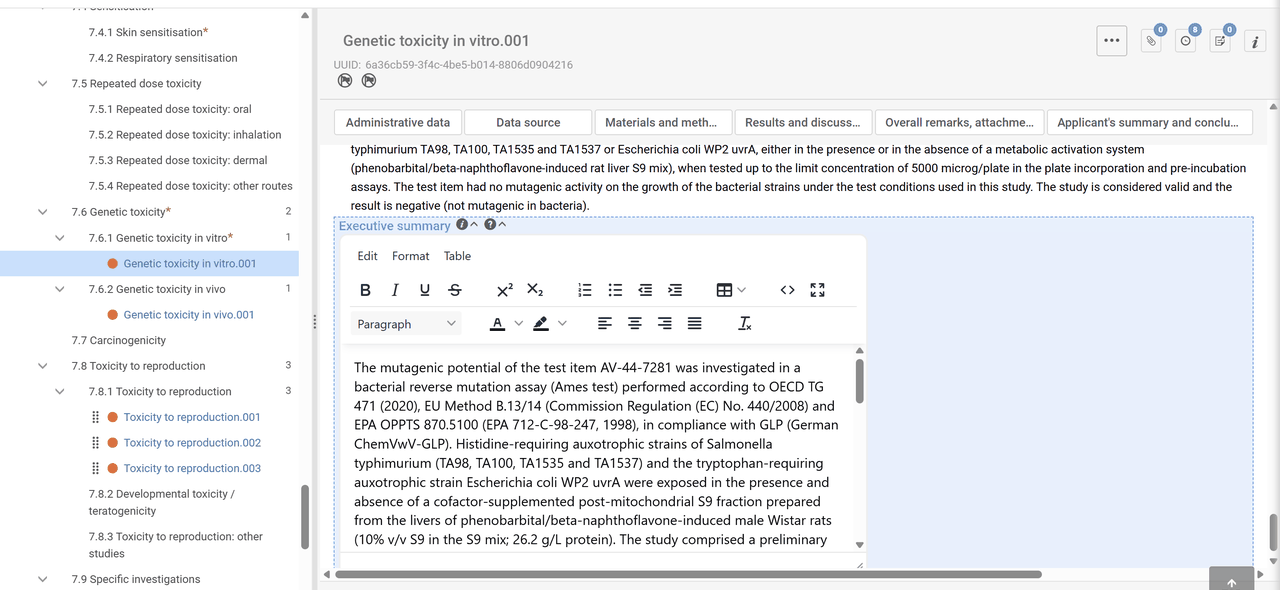
One record per study report and endpoint, drafted against that endpoint's own IUCLID field schema. Materials and methods, results, applicant summary and conclusion, guideline and GLP status, all in their proper fields.

Endpoint summaries

Once a section's studies are in, Dossier Flow drafts the endpoint summary that rolls them up, using the records you already approved as its source rather than re-reading the PDFs.

DNEL, DMEL and PNEC derivations

Chapter level hazard assessment values derived with the ECHA guidance defaults, R.8 for human health and R.10 for the environment. Every assessment factor and derived value is flagged as a draft for your toxicologist or ecotoxicologist to confirm.

Supported today: IUCLID 6, version 10.0.0. Support for a new IUCLID release is published as a version pack on our side, not as software you have to reinstall. Tell us which version you run and we will confirm where it stands.

Pricing

One subscription, plus the AI you use.

A flat access fee per organisation, and drafting credits you top up as you use them. No seat counting, no per-dossier surcharge, no annual commitment.

Access
99 EUR per month, per organisation

Excluding VAT. Billed monthly, cancel any time.

  • No seat counting. Invite your whole team, owner and member roles
  • Every endpoint, summary and derivation in all four chapters
  • The browser extension, on as many browsers as you pair
  • 7 day free trial with 2 EUR of drafting credit, no card needed to start
Sign up for the free trial
Drafting credits

Pay for the AI you use

Drafting a record calls a large language model, and that has a real cost. Rather than hide it in a bigger subscription, we bill it through a wallet you top up. Every top-up is credited to your wallet in full, and drafting is billed at the model cost plus a small service margin. Every job shows what it cost before you approve it, so the price of a dossier is never a surprise.

10 EUR 25 EUR 50 EUR 150 EUR 500 EUR

Consultancies and larger teams

Producing dossiers for several clients, or working through a formal security review before you can trial anything? Write to us. We will answer the questionnaire and discuss what your setup needs.

Contact us
Questions

What people ask before they trial it.

Do you need access to our IUCLID installation?

No. We never ask for its address, an account on it, or a network route to it. The extension works inside the IUCLID tab you opened and logged into yourself, which is why it works the same on IUCLID Cloud, on a server behind your firewall and on a local installation.

What happens to our study reports?

They are stored while they are being worked on, and used to draft the records you review. Once every endpoint a report was tagged to has been approved, the stored file is deleted. A rejected draft keeps its source for a short grace period so you can retry without uploading again. Excerpts are sent to our AI provider for drafting and are not used to train models.

Can it write something we did not approve?

No. An approval is what turns a draft into an action plan, and the extension only ever executes plans that carry one. Before writing it verifies that the record open in front of you is the record the plan targets. A wrong substance stops the run and is never recovered from automatically.

Can it overwrite or delete work we already have in IUCLID?

It cannot delete. The instruction set an approved plan can express is limited to opening a tab, creating a record or a reference, filling a field, adding a repeatable entry and saving. No delete or clear operation exists in it. Where a record for that endpoint is already there, the extension reopens it instead of duplicating it and writes only the fields the plan names, which will replace the content of those specific fields exactly as typing into them would. Everything else in the record is untouched, and more than one existing record stops the run.

Can the AI act on our IUCLID by itself?

No, and not because we forbid it. The model has no network access to your systems, no credentials and no mechanism to trigger anything. It reads a report and returns structured data. That data is checked against the IUCLID field schema, then a person approves it, and only an approval produces something the extension will execute. Remove the human and the pipeline stops at a draft.

How accurate is the drafting?

Accurate enough to be worth reviewing, never accurate enough to be trusted unread. That is the whole design. Drafts arrive with authoring notes, a schema format check, and explicit flags on every derived value. The reviewer is the quality gate, and the tool is built to make that review fast rather than to remove it.

Our study reports are scanned, not digital text. Does that work?

Yes. When a report's pages carry no extractable text, those pages are transcribed by a vision model before drafting starts, and the resulting record is flagged so you know to check the transcription along with the interpretation.

Which IUCLID versions do you support?

IUCLID 6, version 10.0.0 today. Version support lives in a pack on our side rather than in software you install, so a new release is something we publish, not something you upgrade. If you run a different version, tell us and we will give you a straight answer on timing.

Are you affiliated with ECHA?

No. IUCLID is published by the European Chemicals Agency. Dossier Flow is an independent product and is not affiliated with or endorsed by ECHA.

What does a team need to get started?

An account, a browser, and the reports. Create your organisation, add the people who will review, install the extension in the browser you use for IUCLID, and pair it once with a short code that an owner confirms. That is the whole setup.

See it on one of your own studies.

The fastest way to judge this is to run it against a report you already know by heart. Start the trial and draft your first record, or write to us and we will walk through it with you.

Questions, procurement, security review: contact us